Company
Parameters
Company
Parameters
The most important step of starting this accounting system will be the entry
of the company parameters. These fields control all aspects of the accounting
system from the company name that is printed on each report to the general ledger
accounts used for distribution for all the posting operations.
Take your time and make sure your entries will correspond with your General
Ledger Chart of Accounts, the next invoice number to use, etc. Careful entry
and decision making now will save time and avoid problems later.
To
enter / edit the Company Parameters:
- From the main menu, choose the File menu option.
- From the File menu, choose the Company Parameters menu option.
- Edit the company information filled out in each program section:
- General Ledger
- Accounts Receivable
- Accounts Payable
- Payroll
- Invoicing
- Job Cost
- Purchase Orders
- E-Commerce
- Choose the Ok button to save all your changes and to return to the main
menu.
The
Company Parameters Entry Screens

General
Ledger
- Company Name: The company name and address will be used by all portions
of the system for display on reports, invoices, statements, etc.
- Current Year Begins: The beginning date of your company’s current
fiscal year.
- Current Year Ends: The ending date of your company’s current fiscal
year.
- Starting Income Account: The first general ledger account on the
chart of accounts list. The system uses this account when income statements
are generated.
- Ending Income Account: The last general ledger account on the chart
of accounts list. The system uses this account when income statements are
generated
- Default Checking/Cash Account: The
account used by the business status screen to determine cash on hand.

Accounts
Receivable
- A/R Sales Parameters:
- Accounts Receivable Account: The GL Account for Accounts
Receivable.
- Sales Account: The default GL account for sales.
This can be overridden for an individual item basis in invoicing or inventory/billing
codes.
- Sales Discount Account: The default GL Account for
discounts given to customers during the cash receipts process.
- Finance Charge Account: The default GL account for
finance charges on customer past due balances.
- Sales Tax Payable Account: The liability account for
sales taxes payable based on sales taxes charged and the invoice.
- Freight Account: The default GL account for freight charged on
the customer invoice.
- A/R Cash Receipts Parameters:
- Checking Account: The default GL account for receipt of Check Deposits.
- Cash Account: The default GL Account for receipt of Cash Deposits.
- Default Allowance Account: The default GL Account for allowances
given to customers during the receipt process.
- American Express Account: The default GL Account for
deposits from American Express. If you wish a fee to be deducted from the
deposit amount enter the fee percentage under ‘FEE’ and enter the account
number you wish the fees recorded in under Fee Account.
- MasterCard/Visa Account: The default GL Account for
deposits from MasterCard and Visa. If you wish a fee to be deducted from
the deposit amount enter the fee percentage under ‘FEE’ and enter the account
number you wish the fees recorded in under Fee Account.
- Discover Card Account: The default GL Account for
deposits from Discover Card. If you wish a fee to be deducted from the deposit
amount enter the fee percentage under ‘FEE’ and enter the account number you
wish the fees recorded in under Fee Account.
- Other Credit Cards Account: The default GL Account
for deposits from Other Credit Cards. If you wish a fee to be deducted from
the deposit amount enter the fee percentage under ‘FEE’ and enter the account
number you wish the fees recorded in under Fee Account.
- A/R Aging Report Parameters:
- Aging Days / Description: The Accounts Receivable
System allows the current period plus four (4) aging periods. These aging
periods are then reflected on the Accounts Receivable Aging Reports and the
Customer Statements. Each aging period is specified by entering the number
of days to start the aging and the related aging period description.
- Default Printer for Statements: The default network
or local printer name for the printing of Customer Statements if other than
the default printer set up for the machine as the Windows default.
-

Accounts
Payable
- A/P General Ledger Distribution Parameters:
- A/P Checking Account: The default GL Cash Account
used when cutting A/P Checks..
- Accounts Payable Account: The default GL Account for
accounts payable. This account is increased when a vendor invoice is posted
and decreased when a check is cut to a vendor.
- A/P Discount Account: The default GL Account used
when you take a discount while paying a vendor invoice..
- Aging Days / Description: The Accounts Payable System
allows the current period plus four (4) aging periods. These aging periods
are then reflected on the Accounts Payable Aging Reports. Each aging period
is specified by entering the number of days to start the aging and the related
aging period description.
-
- A/P Company Information:
- Federal Business ID: The federal identification number
for the business.
- State Business ID: The state identification number
for the business.
-
- A/P Check Printing:
- A/P Check Style: The default style of check used by
the company for A/P Checks.
- Default Printer for Checks: The default network or
local printer name for the printing of A/P Checks if other than the default
printer set up for the machine as the Windows default
- Next Check Number: The check number to be printed on the next A/P
Check. This value may be overridden at the time of check posting.
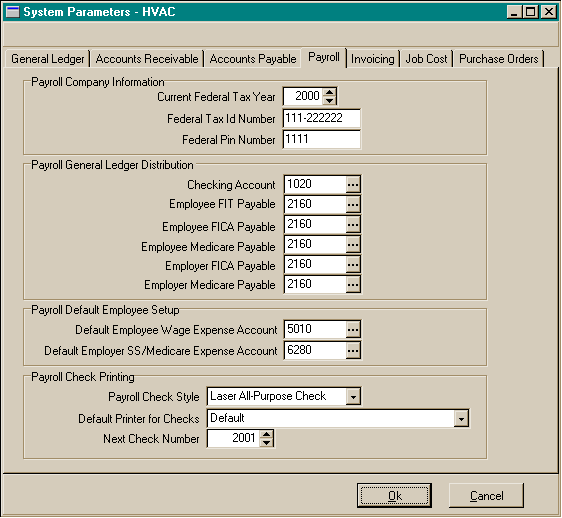
Payroll
- Payroll Company Information:
- Current Federal Tax Year:: The current year for federal
payroll taxes..
- Federal Tax ID Number: Federal Tax ID Number for printing
on reports and W2’s.
- Federal PIN Number: The federal PIN number for Payroll Tax Deposits.
- Payroll General Ledger Distribution:
- Checking Account: The GL account number for the payroll
cash/checking account.
- Employee FIT Payable: The GL account number for the
federal withholding payable account.
- Employee FICA Payable: The GL account number for the Employee FICA
payable account.
- Employee Medicare Payable: The GL account number for the Employee
Medicare payable account.
- Employer FICA Payable: The GL account number for the Employer FICA
payable account.
- Employer Medicare Payable: The GL account number for the Employer
Medicare payable account.
- Payroll Default Employee Setup:
- Default Employee Wage Expense Account: The default GL account number
for the Employee Wages or Salaries. This account can be overridden at the
employee entry level..
- Default Employer FICA/Medicare Expense Account: The default GL account
number for the Employer FICA and Medicare Expense.. This account can be overridden
at the employee entry level..
-
- Payroll Check Printing:
- Payroll Check Style: The default style of check used
by the company for Payroll Checks.
- Default Printer for Checks: The default network or
local printer name for the printing of Payroll Checks if other than the default
printer set up for the machine as the Windows default
- Next Check Number: The check number to be printed on the next Payroll
Check. This value may be overridden at the time of check posting..
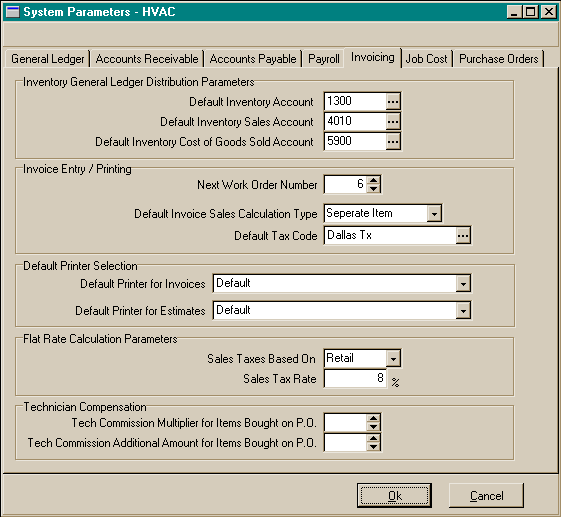
Invoicing
- Inventory General Ledger Distribution Parameters:
- Default Item Inventory Account: The default GL account
for inventory. This account may be overridden on an item by item basis in
the inventory area, or it may be overridden at the line item level of the
invoice.
- Default Item Sales Account The default GL account for
sales. This account may be overridden on an item by item basis in the inventory
area, or it may be overridden at the line item level of the invoice.
- Default Item Cost of Goods Sold Account The default
GL account for cost of goods sold. This account may be overridden on an item
by item basis in the inventory area, or it may be overridden at the line item
level of the invoice.
-
- Document Numbering:
- Next Estimate Number: The number to be assigned to
the next estimate during estimate entry.
- Next Order Number: The number to be assigned to the
next order during order/invoice entry.
- Next Invoice Number: The number to be assigned to
the next invoice during invoice posting..
-
- Sales Tax Options:
- Default Sales Tax Code: The default sales tax code
if no code is specifically assigned to a customer..
- Do you Charge Sales Tax: Used to determine if sales
tax is charges.
- Charge Sales Tax Based on Delivery location: Used
to determine if sales tax is charged based on the customer billing information
or the customer ship to location information.
-
- Default Printer Selection:
- Default Printer for Invoices: The default network
or local printer name for the printing of Customer Invoices if other than
the default printer set up for the machine as the Windows default
- Default Printer for Estimates: The default network
or local printer name for the printing of Customer Estimates if other than
the default printer set up for the machine as the Windows default

Job
Cost
- Job Cost Method:
- Job Cost Method to be Used: The job cost methodology
used by your company for job costing. You should consult your accountant
when making this choice. The job cost methods are:
- C – Completed Contract Method.
- P – Percentage of Completion Method
- N – None with No General Ledger distribution
- Job Cost General Ledger Distribution:
- You must enter the corresponding GL account for each of
the following items:
- Inventory Account
- Payroll Salary Expense Account
- Jobs in Progress Billing Account
- Jobs in Progress Costs Account
- Contract Revenues Earned Account
- Cost of Revenues Earned Account
- Variable Overhead Allocation Account
- Fixed Overhead Allocation Account
- Jobs in Progress Account
- Cost in Excess of Billings Account
- Billings in Excess of Cost Account
- Overhead Allocation Percentage: The percentage to
be used in calculating variable overhead allocation.
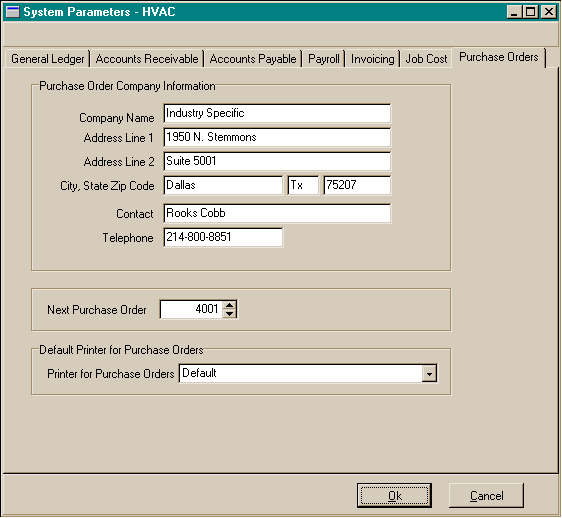
Purchase
Orders
- Purchase Order Company Information: The company name,
address, and contact information to be used as the default company information
on the purchase order.
- Default Printer for Purchase Orders: The default network
or local printer name for the printing of Customer Invoices if other than
the default printer set up for the machine as the Windows default
- .